
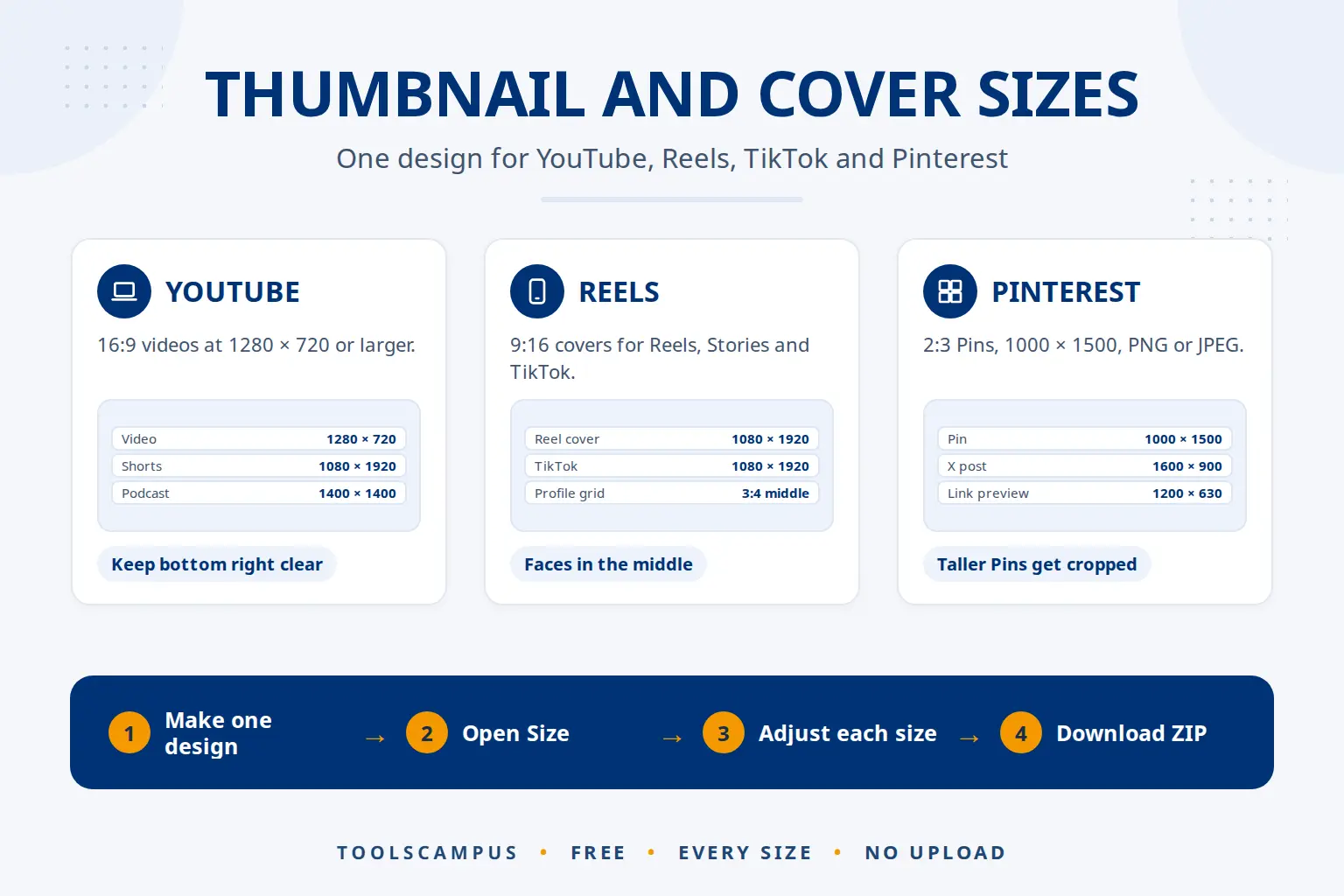
The main thumbnail and cover sizes are 1280 × 720 or larger for a YouTube video (16:9), 1080 × 1920 for YouTube Shorts, Instagram Reel covers, Stories and TikTok covers (9:16), and 1000 × 1500 for a Pinterest Pin (2:3). Vertical covers are also shown cropped, so the safe place for faces and words is the middle.
This guide lists each size, says which numbers are official and which are commonly used, and shows how to make one design that fits all of them.
Make thumbnails and covers for every platform: free, no sign-up, and your photos stay on your device.
Thumbnail and cover sizes at a glance
| Where | Size in pixels | Shape | Status |
|---|---|---|---|
| YouTube video thumbnail | 1280 × 720, up to 3840 × 2160 | 16:9 | Official (YouTube Help): at least 640 wide |
| YouTube Shorts thumbnail | 1080 × 1920, up to 2160 × 3840 | 9:16 | Official (YouTube Help): at least 640 tall |
| YouTube podcast | 1400 × 1400 | 1:1 | Commonly used for square podcast covers |
| Instagram Reel cover | 1080 × 1920 | 9:16 | Commonly used; shown as 3:4 on your profile |
| Instagram Story | 1080 × 1920 | 9:16 | Commonly used (full phone screen) |
| Instagram post | 1080 × 1350 | 4:5 | Commonly used; the tallest feed shape |
| TikTok video cover | 1080 × 1920 | 9:16 | Commonly used (full phone screen) |
| Pinterest Pin | 1000 × 1500 | 2:3 | Official (Pinterest Help) |
| Facebook link or post image | 1200 × 630 | About 1.91:1 | Commonly used for link previews |
| X post image | 1600 × 900 | 16:9 | Commonly used |
| LinkedIn post image | 1200 × 627 | About 1.91:1 | Commonly used |
| Website link preview | 1200 × 630 | About 1.91:1 | Commonly used for shared links |
Apps change their layouts and differ between phones, so treat the covered areas below as a guide, not an exact line. For feed photos and profile pictures rather than covers, see best image sizes for Instagram, Facebook and WhatsApp and profile picture sizes.
YouTube: videos, Shorts and podcasts
YouTube’s help page on thumbnails recommends 3840 × 2160 for videos and 2160 × 3840 for Shorts, in JPG or PNG. Video thumbnails uploaded from a phone can be up to 2 MB, and from a computer up to 50 MB. The video length sits in the bottom right corner, so keep that corner clear. Every detail is in our guide to the YouTube thumbnail size.
Reels, Stories, Shorts and TikTok: the tall covers
All the full-screen video apps use 9:16, so one 1080 × 1920 design works for all of them. What changes is what covers it:
- The top has the app’s tabs or your name.
- The bottom has the caption, the sound and the account name.
- The right edge has the like, comment and share buttons.
Put faces and words in the middle, a little left of centre. Since early 2025, Instagram’s profile grid shows posts and Reel covers as 3:4, which cuts the top and bottom off a 9:16 cover. So the middle 1080 × 1440 of your cover is what people see when they visit your profile.
To add your cover on Instagram, tap Edit cover when you share the Reel and choose your picture from the camera roll. TikTok also has Edit cover when you post: pick a frame, or add your picture where your app version offers it.
Pinterest: tall Pins
The Pinterest product specs recommend a 2:3 shape, or 1000 × 1500 pixels, as PNG or JPEG. Taller Pins may be cropped in the feed. Keep words away from the bottom right, where buttons can sit.
Facebook, X, LinkedIn and link previews
Wide images around 1200 × 630 are commonly used for shared links and posts on Facebook and LinkedIn, and 1600 × 900 (16:9) for X. Previews often trim the edges a little, so keep the title and logo near the middle.
One design, every size
Making a separate design for each app takes time. The Thumbnail maker lets you make it once:
- Make your main design, for example the YouTube video thumbnail.
- Open Size and pick another platform. Your design is fitted to the new shape: template words and photos are placed again for it, and everything else keeps its relative place.
- Turn on Guides to see what that app covers, and adjust. Each size keeps its own changes, so fixing the Reel cover doesn’t move anything on YouTube.
- Click Download, then All sizes (ZIP). Tick the sizes you need and download them in one ZIP, each named after its platform.
Sizes you haven’t opened yet are fitted automatically when you download them. Need a size that isn’t listed? Type it under Custom size, anywhere from 100 to 4096 pixels on each side.
AI and covers
Many apps offer to pick a cover frame from your video for you. It’s quick, but a frame chosen mid-movement often has closed eyes or blur. A designed cover with a clear face and a few words looks better in a grid.
The Thumbnail maker’s AI cut-out helps here: it cuts you out of a photo on your own device, so you can place yourself on a bright background that stands out in every size. If you start from an AI-generated picture, put it inside a design of the right shape instead of stretching it. See how to cut yourself out for a thumbnail with AI.
Common problems
My Reel cover looks cut off on my profile
The profile grid shows a 3:4 part of the 9:16 cover. Move faces and words into the middle 1080 × 1440.
The words are hidden behind the buttons
Turn on Guides for that size and keep text out of the marked areas, especially the bottom and the right edge.
My Pin was cropped
It was taller than 2:3. Use the Pinterest Pin size, 1000 × 1500.
The cover looks blurry after uploading
It was probably made smaller and enlarged by the app. Make it at the full size, such as 1080 × 1920, from your original photo.
Frequently asked questions
What size is a TikTok cover?
1080 × 1920 pixels (9:16), the full phone screen. Keep the main words in the middle, away from the caption and buttons.
What size is an Instagram Reel cover?
1080 × 1920 (9:16). On your profile it is shown as 3:4, so keep the important part in the middle 1080 × 1440.
Can I use the same thumbnail for YouTube and Instagram?
Not without changes, because the shapes differ (16:9 against 9:16 or 4:5). The Thumbnail maker refits one design to each shape and keeps your changes for each.
Which file type is best for covers?
JPG for covers built on a photo: small and accepted everywhere. PNG for designs with lots of fine text or flat colour.
Make all your sizes at once. One design, every platform, one ZIP.
Comments
No comments yet. Ask a question or share a tip that helped you.