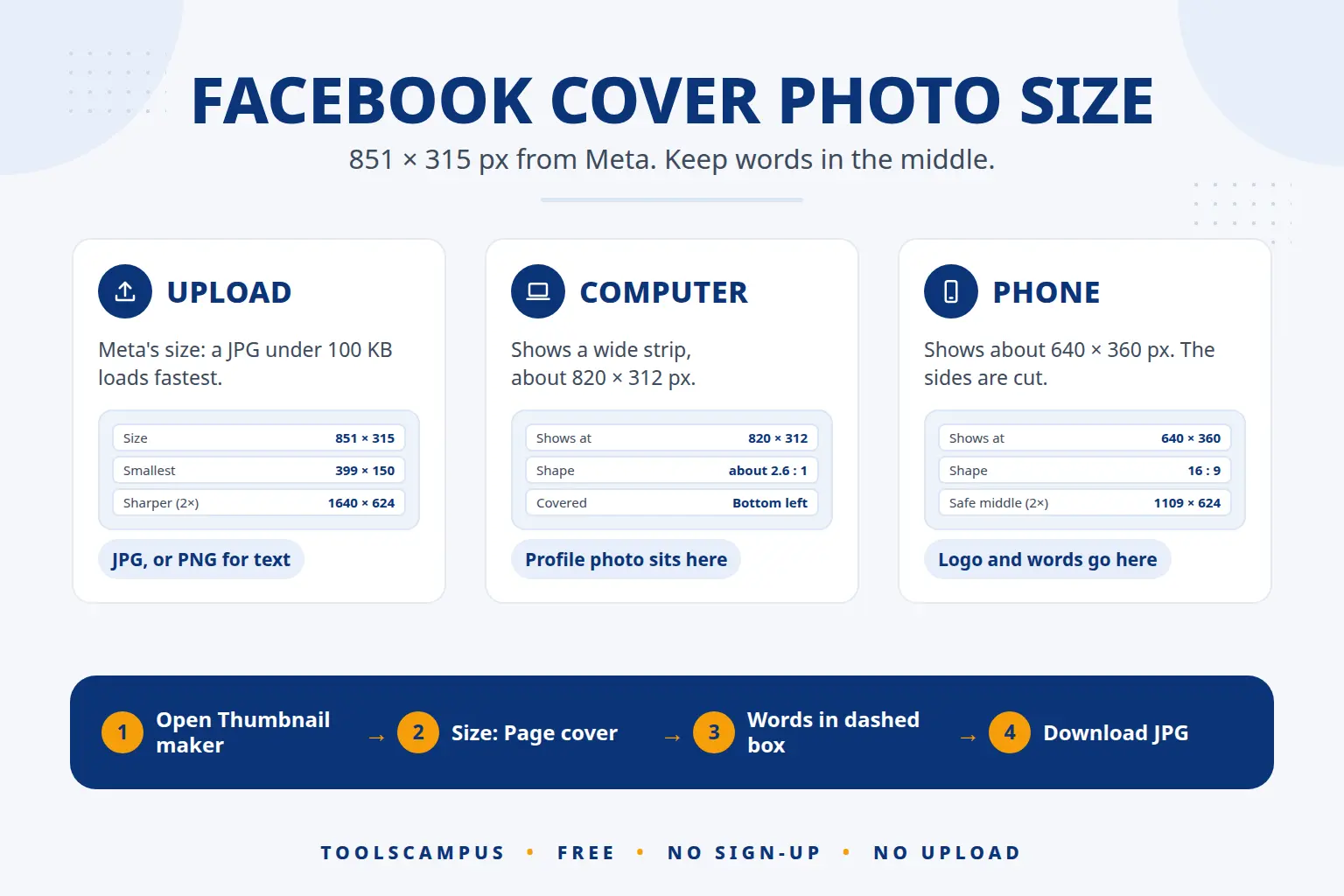
The Facebook cover photo size is 851 × 315 pixels, the size Meta says loads fastest as a JPG under 100 KB. The smallest picture Facebook accepts is 399 × 150. On a computer the cover shows as a wide strip of about 820 × 312 pixels; on a phone it shows at about 640 × 360, which cuts off the left and right sides. Keep your name, logo and any words in the middle and use the edges for background.
This guide explains how the cover is cut on each screen, how to make one at the right size for free, how to upload it, and the sizes for group and event covers.
Make your Facebook cover now: free, no sign-up, with the phone-safe area marked for you.
Facebook cover photo size at a glance
| What | Size or limit |
|---|---|
| Meta’s recommended size | 851 × 315 px |
| Sharper on high-resolution screens | 1640 × 624 px (twice the computer display) |
| Smallest size you can upload | 399 × 150 px |
| Shown on a computer | about 820 × 312 px |
| Shown on a phone | about 640 × 360 px (16:9, sides cut) |
| Safe area for words and logos | the middle 560 × 315 px of an 851 × 315 file (1109 × 624 px of a 1640 × 624 file) |
| File type | JPG under 100 KB for photos; PNG for logos and text |
The upload size, the smallest size and the file advice come from Meta’s help page on cover photo dimensions, which also says that a smaller picture is stretched to fill the space and can look blurry. The computer and phone display sizes are what Facebook shows today and can shift a little when Facebook changes its layout, so leave some room around anything important.
Why your cover looks different on a computer and a phone
Facebook uses one picture for every screen but shows a different part of it on each one. That is why a cover that looks perfect on your laptop can lose the first and last letters of your name on a phone.
- Computer: a wide strip of about 820 × 312 pixels, close to the full picture. Your profile picture sits over the bottom left corner, and your name and buttons sit just below.
- Phone: a 16:9 box of about 640 × 360 pixels. To fit that shape, Facebook shows the full height but cuts the left and right sides. Your profile picture also covers part of the bottom.
So think of your cover in two parts: a background that can be cut at the sides, and a box in the middle, about two thirds of the width, for everything people must be able to read.
How to make a Facebook cover photo at the right size, step by step
- Open Thumbnail maker in Chrome, Edge, Safari or Firefox. It works on a computer or a phone.
- Start a design. Drop a background photo onto the box, or start with an empty design.
- Choose the cover size. Open Size, then choose Facebook and Page cover. The canvas becomes 1640 × 624, twice the computer display size, so the cover stays sharp on high-resolution screens.
- Turn on Guides. A dashed box marked Shows on phones appears in the middle. That is the part a phone keeps. Guides are never saved in the picture.
- Put your name, logo and words inside the dashed box. One or two short lines work best, such as your business name and what you do (“Handmade cakes in Lahore”). Keep them away from the bottom left, where your profile picture sits on a computer.
- Fill the rest with background. A photo, a colour or a simple pattern works. Nothing important should sit near the left or right edge.
- Check it in Preview. Switch from Design to Preview to see the cover, then go back and adjust.
- Download. Click Download, then JPG for a photo cover. Choose PNG if your cover is mostly a logo, flat colours and text, so the edges stay crisp.
Want yourself or a product on the cover? Click the photo and use Cut out the person; the AI removes the background on your own device. For a single photo you can also use Remove background, as explained in our guide to removing the background from an image.
How to add or change your cover photo on Facebook
On a computer:
- Go to your profile or Page.
- Click Edit cover photo (or Add cover photo if there is none yet) at the bottom right of the cover.
- Choose Upload photo and pick your JPG or PNG.
- Drag the picture to set its position if needed, then click Save changes.
In the Facebook app, open your profile or Page, tap the camera icon on the cover and choose Upload photo. After saving, open your profile on a phone and on a computer once to check that nothing important is cut.
Design tips for a cover that works on every screen
- Say who you are in a few words. A Page cover is often the first thing a new visitor sees, so your name and what you offer matter more than a long slogan.
- Use big, bold text. On a phone the cover is only about 640 pixels wide, so small text becomes unreadable. A bold font with an outline or a solid shape behind it stays clear.
- Leave the bottom left quiet. The profile picture covers it on computers, so a face or a word there will be hidden.
- Match your other covers. Use the same colours and font as your YouTube banner and thumbnails so you look like one brand everywhere. Our guide on the YouTube banner size uses the same maker.
- Keep the file small. Meta says a JPG under 100 KB loads fastest. If yours is bigger, shrink it with Compress image; our guide on compressing images without losing quality shows how to keep text sharp.
Other Facebook image sizes
| Image | Size to use |
|---|---|
| Profile or Page cover | 851 × 315 px (or 1640 × 624 px for extra sharpness) |
| Group cover | 1640 × 856 px, a 1.91:1 shape |
| Event cover | A 1.91:1 picture such as 1920 × 1005 px; Meta does not publish one fixed size |
| Link or post image | 1200 × 630 px |
| Profile picture | A square photo, shown as a circle |
Group and event covers use a taller shape than a profile cover, so do not reuse the same file: make or crop a separate one. Crop image can cut a photo to exact pixels, and Resize image can make it bigger or smaller without changing its shape. The Thumbnail maker also has a ready Link or post image size for Facebook, plus sizes for YouTube, Instagram, TikTok, X, LinkedIn and Pinterest. For every network in one place, see social media image sizes, and for profile pictures, profile picture sizes.
Common problems
My words are cut off on a phone
They are too close to the left or right edge. Open the cover again, turn on Guides and move everything into the dashed box in the middle.
My cover looks blurry
The picture is smaller than the space Facebook gives it, so it is stretched. Make the cover at 851 × 315 or larger (1640 × 624 is sharper), and start from a large photo or a plain colour background.
Facebook says the photo is too small
Covers must be at least 399 × 150 pixels. Make a new one at the recommended size rather than stretching a small picture.
Text and logos look fuzzy after uploading
Facebook compresses JPG photos. For a cover that is mostly text, a logo or flat colours, download a PNG instead, as Meta’s help page suggests.
My face or logo is hidden behind the profile picture
On a computer the profile picture sits over the bottom left of the cover. Move the subject towards the middle or the right and leave that corner as background.
Frequently asked questions
What is the best size for a Facebook cover photo?
851 × 315 pixels is the size Meta recommends. If you want it sharper on high-resolution screens, use 1640 × 624, twice the computer display size. In both cases keep words in the middle.
What is the Facebook cover photo size on mobile?
Phones show the cover at about 640 × 360 pixels, a 16:9 shape. That keeps the full height but cuts the left and right sides, so only the middle part of your cover is seen.
Is the Facebook Page cover the same size as a profile cover?
Yes. Personal profiles and Pages use the same cover size. Group and event covers are different and taller.
Can I make a Facebook cover on my phone?
Yes. Open the Thumbnail maker in Safari or Chrome, choose the Facebook Page cover size and download the picture. Then upload it from the Facebook app.
Is the cover maker free?
Yes. There is no account, no watermark and no limit. Your photos are not uploaded to us, because everything runs in your browser.
Make your Facebook cover now. Pick the Page cover size, keep your words in the dashed box and download in a few minutes.