Private by design
Your pictures never leave your device. Everything happens in your browser, so nothing is uploaded or stored on our servers.
 ToolsCampus
Shrink photos and screenshots so they upload faster, fit email and form limits, and load quickly on websites. Pictures keep their look; hidden camera and location data is removed.
JPG, PNG or WebP, up to 50 pictures
Your files are processed on your device and are never uploaded.
How it works
Why use it
Your pictures never leave your device. Everything happens in your browser, so nothing is uploaded or stored on our servers.
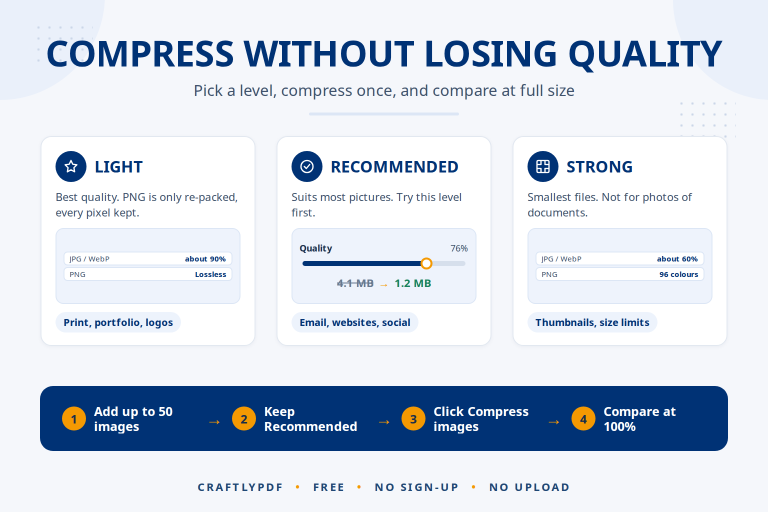
PNG files are made smaller by reducing their colours, the same method popular PNG optimisers use, and keep their transparent areas.
Camera details and GPS location saved inside photos are left out of the compressed copy. Phone photos are turned the right way up first.
Questions, answered
It depends on the picture. Phone photos often shrink by half or more with the Recommended level. Pictures that were already compressed may barely change; if a smaller file is not possible, the original is kept.
JPG and WebP compression removes detail the eye rarely notices. Use Light if you need the most detail, or Strong for the smallest files. Your original pictures are not changed.
No. The pictures are compressed by your browser on your own device and saved straight back to it.
JPG (JPEG), PNG and WebP, up to 50 pictures at a time and 50 MB each. GIF, SVG and HEIC are not supported yet.
Compress an image without losing quality you can see. Pick the right level for JPG, PNG and WebP, and avoid mistakes that…