Nothing cut off
Fit keeps every pixel of your photo and fills the new space with a soft blurred copy of it, a colour of your choice, or transparency.
 ToolsCampus
Aspect ratio changer
Need a photo in a different shape, for a story, a YouTube video or an Instagram post? Pick the new aspect ratio and keep the whole picture with a blurred or coloured border, or fill the shape and choose what stays. Several pictures at once, with a live preview.
JPG, PNG or WebP, up to 50 pictures
Your files are processed on your device and are never uploaded.
No picture needed
The aspect ratio is the shape of a picture or screen: its width compared with its height. Find the ratio of any size, or the missing width or height for a ratio.
1920 × 1080 = 16:9
Type a width to get the height, or a height to get the width.
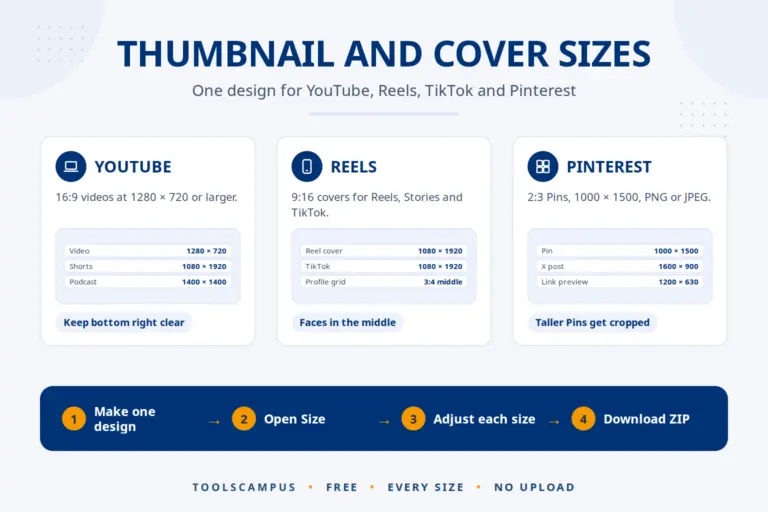
| Ratio | Used for | Common sizes (pixels) |
|---|---|---|
| 1:1 | Instagram post, profile photos | 1080 × 1080 |
| 4:5 | Instagram and Facebook feed (portrait) | 1080 × 1350 |
| 9:16 | Stories, Reels, TikTok, YouTube Shorts | 1080 × 1920 |
| 16:9 | YouTube, TV, laptop screens, slides | 1920 × 1080, 1280 × 720 |
| 4:3 | iPad, older monitors and slides | 1024 × 768, 1600 × 1200 |
| 3:2 | Camera photos, 6 × 4 inch prints | 1800 × 1200, 6000 × 4000 |
| 2:3 | Pinterest pins, 4 × 6 inch prints | 1000 × 1500 |
| 21:9 | Ultrawide monitors, cinema | 2560 × 1080, 3440 × 1440 |
How it works
Why use it
Fit keeps every pixel of your photo and fills the new space with a soft blurred copy of it, a colour of your choice, or transparency.
Ready shapes for stories, Reels, TikTok, Shorts, YouTube, Instagram and Pinterest, plus any custom ratio, and an exact width such as 1080 pixels.
Your pictures never leave your device. Everything happens in your browser, so nothing is uploaded or stored on our servers.
Questions, answered
Choose the new shape and keep "Keep the whole picture". The photo stays complete and the empty space becomes a border: a blurred copy of the photo, white, black, any colour, or transparent.
It is the shape of the picture: its width compared with its height. 1920 x 1080 is 16:9 (wide), 1080 x 1920 is 9:16 (tall) and 1080 x 1080 is 1:1 (square). The calculator below works it out for any size.
Resolution is the number of pixels, such as 1920 x 1080; the aspect ratio is only the shape, 16:9. A 1280 x 720 picture has a lower resolution but the same 16:9 shape.
Instagram feed: 4:5 (1080 x 1350) or 1:1 (1080 x 1080). Stories, Reels, TikTok and Shorts: 9:16 (1080 x 1920). YouTube videos and thumbnails: 16:9 (1920 x 1080 or 1280 x 720).
No. With Full quality the photo keeps all its pixels and only gets a border, or is only cut. Setting a smaller width makes the picture smaller, as you would expect.
No. Everything happens in your browser on your own device.
Comments
No comments yet. Ask a question or share a tip that helped you.