
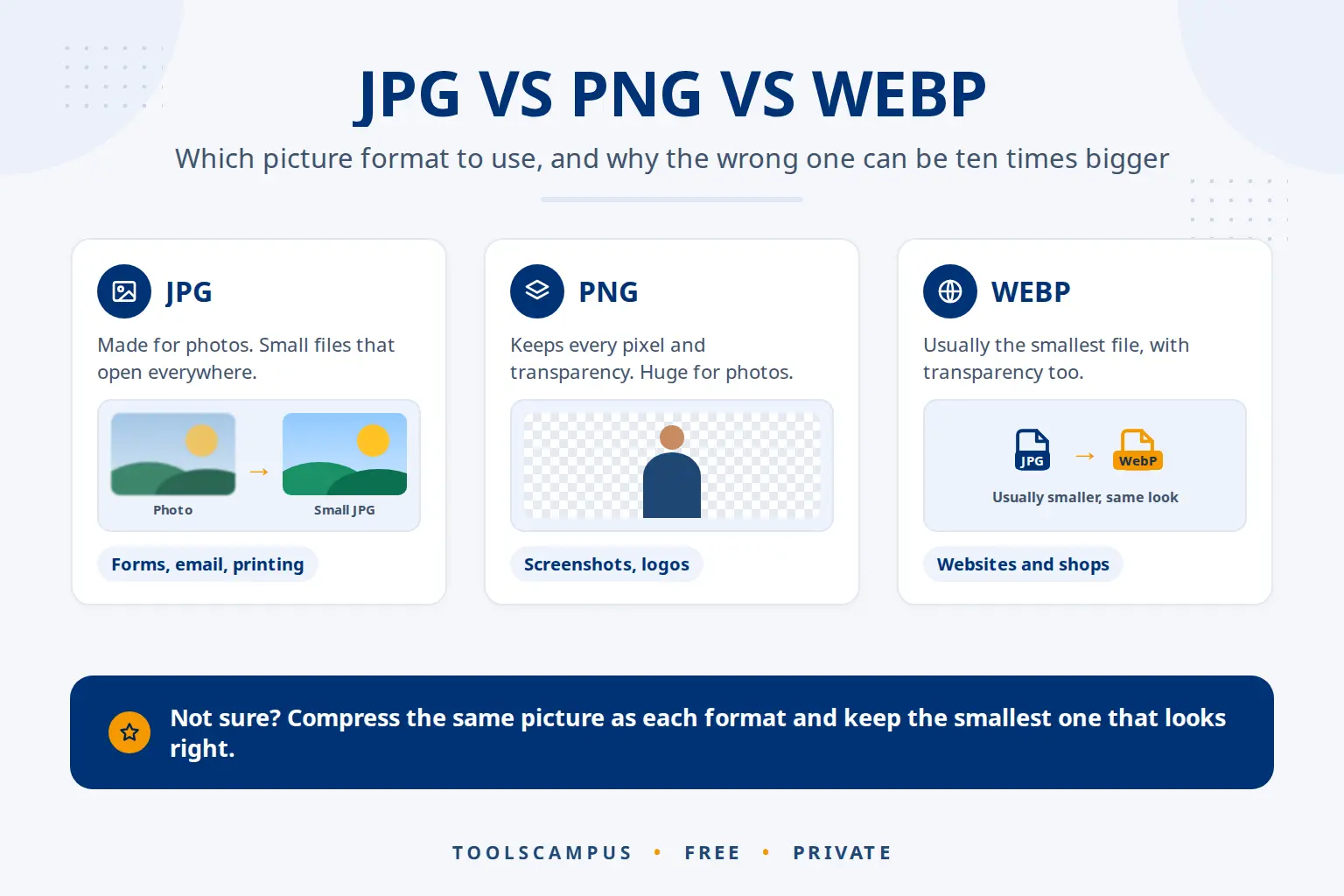
In the JPG vs PNG vs WebP choice, WebP usually gives the smallest file for both photos and graphics. For photos, JPG comes next and PNG is by far the largest. For screenshots, logos and graphics with text, PNG or lossless WebP stay crisp, while JPG makes edges fuzzy. Use JPG or PNG wherever WebP isn’t accepted.
This guide compares the three formats side by side, explains why the same picture can be ten times bigger in the wrong format, and shows how to test which format is smallest for your own picture.
Compress or convert your pictures now: free, no sign-up, and your pictures stay on your device.
Which format to use: the quick answer
| Your picture | Smallest file | Safe fallback | Avoid |
|---|---|---|---|
| Photo (people, places, products) | WebP | JPG | PNG: very large files |
| Screenshot with text | PNG or lossless WebP | PNG | JPG: fuzzy text |
| Logo or icon with a transparent background | PNG or WebP | PNG | JPG: no transparency |
| Cut-out product photo with a transparent background | WebP | PNG | JPG: background turns solid |
| Chart or diagram | PNG or WebP | PNG | JPG: blurry lines |
JPG vs PNG vs WebP compared side by side
| Feature | JPG (JPEG) | PNG | WebP |
|---|---|---|---|
| Compression | Lossy | Lossless | Lossy or lossless |
| Transparent areas | No | Yes | Yes |
| Animation | No | Rarely used | Yes |
| Size for a photo | Small | Very large | Smallest |
| Size for a screenshot | Medium, and blurry | Small | Smallest |
| Works in web browsers | All | All | All current browsers |
| Accepted by upload forms | Almost everywhere | Almost everywhere | Not always |
When JPG is the right choice
JPG was made for photos. It stores a picture as smooth areas of colour and throws away tiny detail the eye doesn’t notice, which is why photos become small files. The quality setting controls how much is thrown away, and our guide on compressing pictures without visible quality loss shows which setting to pick.
Use JPG when a photo must work everywhere: job and visa application forms, older software, printing shops, and email to people whose programs you don’t know. Its weak spots are sharp edges and text, which get a faint haze around them, and transparency, which it doesn’t support at all. Phone photos are often very large JPG or HEIC files; making a photo smaller on your phone covers both.
When PNG wins, and why PNG photos are huge
PNG keeps every pixel exactly. That is perfect for screenshots, logos and diagrams, which have large areas of one colour that pack together very well. Text stays razor sharp and transparent backgrounds are kept.
A photo is different: it has millions of slightly different colours, and lossless packing can’t do much with that. The same photo saved as PNG is often several times bigger than a good JPG. If you have photos saved as PNG, converting them to JPG or WebP is the quickest saving you can make. For screenshots that are already PNG, reducing the number of colours shrinks them a lot without changing the format; see how to shrink a PNG and keep transparency.
Why WebP is usually smallest
WebP was created by Google for the web. It can work like JPG (lossy) or like PNG (lossless), and it supports transparency in both modes. According to Google’s WebP documentation, lossy WebP files are 25 to 34% smaller than comparable JPGs, and lossless WebP files about 26% smaller than PNGs.
The catch is compatibility outside the browser. Some upload forms only accept JPG or PNG, some older photo editors and email programs can’t open WebP, and some printing services refuse it. WebP is the best choice for your own website, and JPG is the safe choice for everything you send to others.
Test which format is smallest for your picture
Every picture is different, so the fastest way to decide is to try:
- Open Compress image and add your picture.
- Leave Save as on Same format as the original and click Compress images. Note the size in the list.
- Click Start over with a new file, add the same picture again, and choose WebP (small, keeps transparency) under Save as. Then try JPG (photos, no transparency) if your picture has no transparent areas.
- Compare the sizes and download the smallest one that looks right.
If a converted picture comes out bigger, the list says larger, because of the format change, which tells you the original format already suited that picture.
Which format for AI images and AI uploads
AI image generators such as ChatGPT, Gemini and Midjourney often give you PNG files, even for photo-like pictures. That keeps the full quality for editing, but it makes the files large. Keep the PNG as your master copy, and save a WebP version for your website or a JPG version for social media and forms.
When you upload pictures to an AI assistant such as ChatGPT, Claude, Gemini or Copilot, the format matters less than the readability. Screenshots of text, code or tables are best kept as PNG, so the letters stay crisp and the AI reads them correctly. Photos can be JPG. Always check what the AI reads from a picture against the original, and check the service’s privacy settings before uploading personal pictures.
Common problems
A website won’t accept my WebP picture
Convert it with Save as: JPG in Compress image. If the picture has a transparent background, keep it as PNG instead.
The transparent background turned white
JPG has no transparency, so see-through areas are filled with white. Choose WebP or keep the PNG format.
My screenshot looks blurry after saving as JPG
JPG softens sharp edges. Keep screenshots as PNG, and use the Recommended level to make them smaller with fewer colours.
I need the pictures in a PDF
Use JPG to PDF, which takes JPG, PNG and WebP. Photos stay JPG inside the PDF, while PNG and WebP pictures are kept sharp. See PNG to PDF without losing quality for screenshots. Going the other way, PDF to JPG lets you choose JPG or PNG for the pages; saving PDF pages as sharp PNGs explains when PNG is the better pick.
Frequently asked questions
Is WebP better than JPG?
For websites, usually yes: WebP files are smaller at the same visible quality and can be transparent. JPG is still better when a file must open everywhere, such as upload forms and older programs.
Is PNG higher quality than JPG?
PNG keeps every pixel exactly, so it never adds blur. For photos, a good JPG looks the same to the eye at a fraction of the size, so higher quality on paper rarely matters.
Are JPG and JPEG the same?
Yes. They are two spellings of the same format. Older Windows versions only allowed three-letter file extensions, which is where .jpg comes from.
Should I convert all my images to WebP?
Convert the pictures on your own website, where every modern browser shows them. Keep JPG or PNG copies for email, forms, printing and anyone who needs to edit them.
Try all three formats on your picture. Free, private, and you see the size of each result straight away.
Comments
No comments yet. Ask a question or share a tip that helped you.